01 Pune Meetups

Case file 01
Networking that ends in an actual meeting
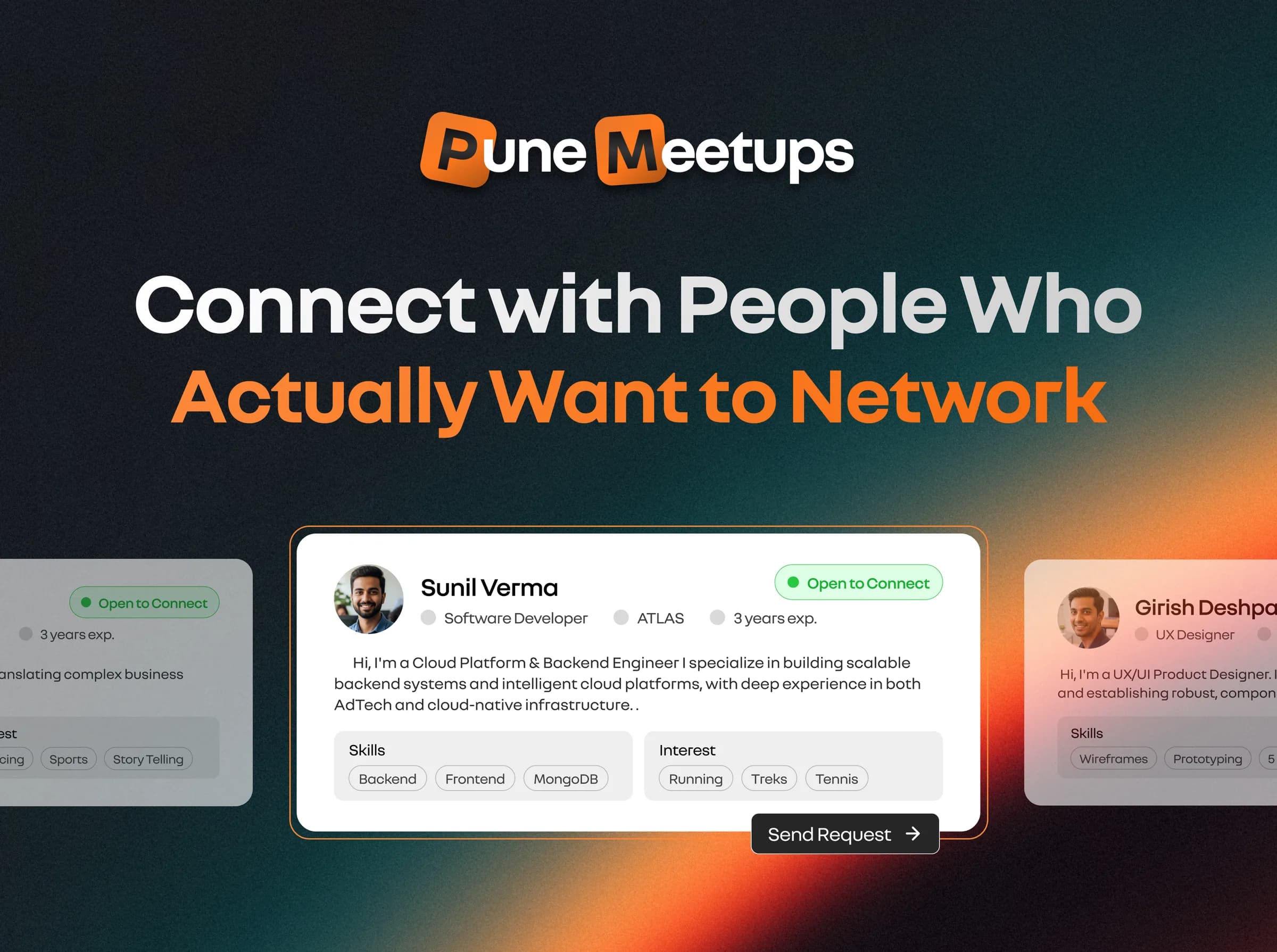
LinkedIn shows you who's out there; it rarely gets you a coffee with them. Pune Meetups lists the city's tech events and lets you browse people who are open to meet, send a request with a note, and chat once they say yes.
built for my own problem first
- Year
- 2025 – now
- Role
- Product, design, frontend
- Stack
- React, FastAPI, MongoDB
- Built with
- Lovable, Emergent, then by hand
- Status
- Live
Problem
Pune has plenty of tech events and people, but no easy way to go from “we're both into DevOps” to actually meeting.
What I built
Event listings plus 1:1 networking: a full profile, an “open to meet” switch, a swipe deck, requests with a note, and chat.
Result
15+ people signed up on their own and matched mostly around cloud, DevOps, writing, software and design.
Why it exists
Everyone is on LinkedIn. Not everyone on LinkedIn chooses to meet.
this one is personal
In college and my first job, I kept struggling to meet people who shared my skills or interests. I joined groups, went to random events and sent cold DMs. None of it turned into real conversations, and none of it felt natural.
LinkedIn gives you visibility, but it rarely turns into a 1:1 meeting. Meetup platforms are built around events, not people. Social apps aren't built for professional intent. There was no simple, comfortable way to meet people in Pune who matched my background and goals.
What's broken
Events are built for crowds, not for two people
Who it's for: Gen Z professionals and students in Pune who want to meet peers on purpose, not by luck.
Great for being seen. A connection request almost never turns into a conversation, let alone a coffee.
Meetup pages
All about the event. You show up, listen, and leave without knowing who else in the room wanted to talk.
Cold DMs
Possible, but awkward. Nothing tells you the other person wants to meet anyone at all.
The bet
Gen Z already knows swipe-and-match patterns from Bumble and Tinder: familiar, low-pressure and intentional. Networking built the same way might get more people to actually meet.
Thinking it through
How do you make the meet actually happen?
my raw notes, unedited
My brainstorm on one question: how do you get two people from a profile to a real meeting? These are the notes as I wrote them.
How to make the meet happen
- The profile section details of a user will be a game changer. The more relevant it looks, the more likely a user will try make a connect. (made it into the product)
- Should we have two categories? Those who just want to connect and those who want to meet
- The ‘Open to connect’ badge. (made it into the product)
- Should we provide the ability to set the date range when the user is open for a meet/network/collab? If yes, should we automatically disable the badge status?
- Options: Always | Weekends only | Specific date etc (Can put these on the batch)
- Should we change the ‘Make a friend’ view to ‘Ask to meet’? or it should be both? (made it into the product)
- User flow: Create profile → Browse → Asks someone → The other user accepts request → Connect happens. (made it into the product)
- How a user will trust to any profile? The LinkedIn link might get some creditability. (made it into the product)
- When a user accepts ‘ask to meet’ request, then the direct whatsapp number will get shared with both. A popup should come, ‘Start a conversation directly on whatsapp’.
- While onboarding we should ask, where we should send the notification when someone asks to meet? Options: Email | Whatsapp (made it into the product)
What made it into the product
- A six-step onboarding nobody can skip
- The “open to meet” switch and badge
- “Ask to meet” on every profile card
- The flow as built
- A LinkedIn icon on every card (Oct 2025)
- Email alerts for every request
Key decisions
Three calls that shaped it
decision 1
Should people be able to skip onboarding?
Optional profile
Faster sign-up, but browse fills up with empty cards nobody wants to message.
Six required stepswent with this
Basic info, bio, skills, meeting preferences, interests and goals. Slower, but every card is worth reading.
Browsing people is the whole product, so an empty profile is a broken product for everyone else. I did add a skip button at one point to cut drop-off, then took it out again. The bio needs at least 25 words, and working people and students get different questions.
The costSome people drop off halfway. I'd rather have fewer, real profiles.
decision 2
Who should see you?
Always listed
Bigger browse list, but being listed starts to mean being available, whether you are or not.
An “open to meet” switchwent with this
You choose when you show up. Turning it off hides you from browse straight away.
Being on the platform shouldn't mean being up for a meeting. With the switch, a request only reaches someone who said they're open, and the badge shows everywhere they appear, so nobody has to guess.
The costFewer people in browse at any given moment.
decision 3
Grid or swipe?
A grid of profile cards
Quick to scan, and just as quick to skim past twenty people without messaging one.
A swipe deckwent with this
One person at a time, with the full profile on the card. Drag, tap the arrows, or use the keyboard.
The grid made browsing feel like scrolling a feed. One card at a time slows you down just enough to actually read about someone, which is the point. It's also the pattern the bet was about.
The costSlower to scan, so the full detail view stays for anyone who wants to dig in.
Design → build
AI tools got it started. Reading the code got it shipped.
first deploy shipped with a sign-in bug
Most of the 187 commits came from AI tools. The interesting part is where they stopped being enough.
Sep 2025
Started in Lovable
Generated the first events frontend, then reworked it: dark theme, glass cards and custom type.
2 Oct 2025
First MVP
Homepage, six event cards and their popups, finished in one long day.
4–5 Oct 2025
Emergent builds the people side
An AI agent generated sign-in, profiles, requests and messaging over a weekend. Its UI didn't fit, so I redesigned those screens and wired them up myself.
10 Oct 2025
Emails and the first deploy
Kankshit added email alerts for requests and messages and fixed timestamps across the app.
15 Oct 2025
After the Saturday event
The first real use at a meetup, and a round of fixes straight after it.
Nov 2025
Profiles grow up
A full detail view for each person and a new My Profile page.
Oct 2026
The swipe deck
Browse becomes one person at a time.
What broke
Generated code still needs someone who reads it
Sign-in broke on the real domain
The session cookie and CORS assumed localhost. I listed the allowed origins explicitly and removed the local assumptions.
Existing users got stuck
Saving a profile failed with “profile already exists”. Profile saving now creates or updates, plus a one-off migration.
New users skipped onboarding
The backend marked people as onboarded too early, and a check on a missing value misfired. Both are stricter now.
The product
What it looks like
screen soon
screen soon
screen soon
screen soon
screen soon
Impact
Small, real, and organic
People found it on their own, filled in a six-step profile, and started making 1:1 connections, mostly around cloud computing, DevOps, writing, software engineering and design.
- organic sign-ups
- 15+
- onboarding steps, none skippable
- 6
- commits, most from AI tools
- 187
What I learned
What I'd tell myself at the start
- 01
Start from your own problem
It made every call easier: I knew what an awkward first message felt like.
- 02
Familiar beats clever
For Gen Z, a pattern they already know from dating apps needed no explaining.
- 03
Generated isn't finished
AI got the backend standing in a weekend. Keeping it standing meant understanding how it worked.
- 04
Real users go off script
What changed after the Saturday event came from watching people use it, not from my plan.
Credits. Email notifications and timestamp fixes by Kankshit Vijay Majhodkar.
 KYRO